Renovate AI - AI Tool for Architecture & Design

4.8

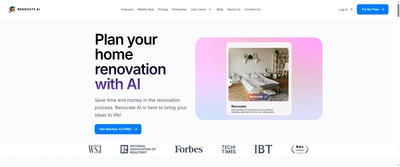
Renovate AI is a mobile and desktop renovation studio that lets homeowners, contractors, and agents upload any room or exterior photo, apply more than 75 curated looks, recolor finishes, and add new furniture arrangements in seconds. The platform includes Renovate AI Studio for pro-level rendering where users can remove clutter, change wall materials, upscale imagery to 4K, and keep multiple versions synced across devices.

Key Features

Upload or capture any room and restyle it instantly with 75+ curated looks including modern, Victorian, and mid-century palettes
Renovate AI Studio workspace for clutter removal, material swaps, fixture updates, and 4K upscaling
1,000 free visualization credits for new users plus flexible credit packs for teams
Supports interiors, exteriors, landscaping concepts, and paint studies so entire properties can be refreshed in one workflow
Mobile app (4.8 rating) and desktop experience with seamless project syncing for contractors on the go
Style Transfer mode to apply community-generated looks and share before/after stories with clients
Detailed export controls for agencies needing consistent aspect ratios across web, social, and presentation decks

Overview

Renovate AI is a mobile and desktop renovation studio that lets homeowners, contractors, and agents upload any room or exterior photo, apply more than 75 curated looks, recolor finishes, and add new furniture arrangements in seconds. The platform includes Renovate AI Studio for pro-level rendering where users can remove clutter, change wall materials, upscale imagery to 4K, and keep multiple versions synced across devices.

Research Highlights & Evaluation Tips

Renovate AI advertises key functions such as Upload or capture any room and restyle it instantly with 75+ curated looks including modern, Victorian, and mid-century palettes, Renovate AI Studio workspace for clutter removal, material swaps, fixture updates, and 4K upscaling, 1,000 free visualization credits for new users plus flexible credit packs for teams, Supports interiors, exteriors, landscaping concepts, and paint studies so entire properties can be refreshed in one workflow. These capabilities are pulled directly from the vendor’s public materials so your team can gauge how the platform copes with everyday project requests.

Teams typically deploy Renovate AI for workflows like Listing agents stage vacant or outdated rooms with multiple moods for MLS, social media, and print mailers, Contractors present kitchen, bathroom, and exterior remodel options to clients before demolition begins, Homeowners test material palettes, landscaping ideas, and lighting changes before ordering finishes. Mapping these scenarios to your current pipeline makes it easier to justify pilot budgets and set measurable KPIs.

Trusted by more than 20,000 contractors, agents, and renovators to visualize interiors, exteriors, and landscapes with AI-powered staging. This context helps you understand the operating maturity behind Renovate AI before committing sensitive client work to the platform.
Implementation checklist

  • Start with the free allocation to validate output quality and confirm the UI works on the hardware your team carries into the field.
  • Paid options such as Studio Pro, Enterprise unlock higher resolution exports and support commitments—use these tiers when client deliverables demand consistent turnarounds.

Best Fit, Tradeoffs, and Alternatives

When to shortlist Renovate AI

  • Renovate AI is most relevant when your team is actively comparing virtual staging & furnishing options rather than browsing a generic AI directory.
  • Use the free tier first to test output quality, prompt control, and export constraints before adding it to a client-facing workflow.

Questions before adoption

  • Does Renovate AI support the deliverable you need this week, such as Listing agents stage vacant or outdated rooms with multiple moods for MLS, social media, and print mailers or Contractors present kitchen, bathroom, and exterior remodel options to clients before demolition begins?
  • Can the exported files, resolution, and licensing terms survive review by your project lead, broker, or client?
  • Is there a clear owner on your team who will maintain prompts, before/after examples, and accepted output standards?

Use Cases

Listing agents stage vacant or outdated rooms with multiple moods for MLS, social media, and print mailers
Contractors present kitchen, bathroom, and exterior remodel options to clients before demolition begins
Homeowners test material palettes, landscaping ideas, and lighting changes before ordering finishes
Short-term rental operators refresh visuals for high-season marketing without scheduling full photo shoots

Pricing

Free Plan

  • 1,000 visualization credits to test workflows
  • Access to curated style library and clutter removal tools
  • Project syncing between mobile and desktop apps

Paid Plans

Studio Pro

Custom subscription

Professional renovators, stagers, and marketing teams

  • Unlimited access to Renovate AI Studio
  • 4K exports and video-ready renders
  • Advanced paint/material editing
  • Priority roadmap updates for agencies
Billing: monthly

Enterprise

Contact sales

National brokerages and renovation platforms

  • Seat management for large brokerages or contractors
  • Dedicated success manager and training sessions
  • API access for automated content creation
  • Centralized asset libraries and compliance reviews
Billing: monthly
Free trial availableEnterprise plan available

Renovate AI FAQ

What is Renovate AI best for?

Renovate AI is best evaluated for Listing agents stage vacant or outdated rooms with multiple moods for MLS, social media, and print mailers, Contractors present kitchen, bathroom, and exterior remodel options to clients before demolition begins, Homeowners test material palettes, landscaping ideas, and lighting changes before ordering finishes. Compare it against your required deliverable, export quality, and review process before adoption.

Is Renovate AI free or paid?

Renovate AI offers a free option or free starting allocation, but teams should review credit limits, export restrictions, and paid tiers before production use.

What should I compare Renovate AI with?

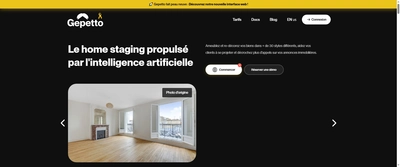
Compare Renovate AI with Gepetto App, Palette Immo, Paintit AI if you want alternatives in the same Virtual Staging & Furnishing category.

Quick Info

Category

Interior Design

Subcategory

Virtual Staging & Furnishing

Pricing

Paid

Last Updated

2026-01-11

Try Renovate AI

Company Information

Support Options

HTML Sitemap