SketchUp Diffusion - AI Tool for Architecture & Design

NEW

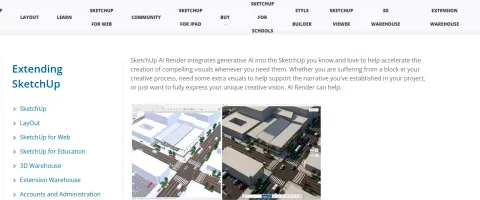
SketchUp Diffusion (AI Render) is a SketchUp Labs generative AI feature that combines the active SketchUp viewport with a text prompt or preset style to create concept images directly inside SketchUp. It is designed for fast massing-to-visual workflows, giving teams a quick way to test style directions, lighting moods, and material intent without exporting to a separate renderer.
Key Features

Combine the active SketchUp viewport with a text prompt or preset style
Adjust prompt influence to balance geometry fidelity and creativity
Mask areas to erase, regenerate, or add elements
Reference image support for stylistic direction
Overlay AI output on the model for iterative studies
Save AI-generated images for presentations
Available on SketchUp Desktop, Web, and iPad

Overview

SketchUp Diffusion (AI Render) is a SketchUp Labs generative AI feature that combines the active SketchUp viewport with a text prompt or preset style to create concept images directly inside SketchUp. It is designed for fast massing-to-visual workflows, giving teams a quick way to test style directions, lighting moods, and material intent without exporting to a separate renderer.
Research Highlights & Evaluation Tips

SketchUp Diffusion advertises key functions such as Combine the active SketchUp viewport with a text prompt or preset style, Adjust prompt influence to balance geometry fidelity and creativity, Mask areas to erase, regenerate, or add elements, Reference image support for stylistic direction. These capabilities are pulled directly from the vendor’s public materials so your team can gauge how the platform copes with everyday project requests.

Teams typically deploy SketchUp Diffusion for workflows like Early-stage massing visualization, Rapid style exploration for client reviews, Concept mood boards from SketchUp scenes. Mapping these scenarios to your current pipeline makes it easier to justify pilot budgets and set measurable KPIs.

Implementation checklist

  • Paid options such as SketchUp Subscription unlock higher resolution exports and support commitments—use these tiers when client deliverables demand consistent turnarounds.

Technical Specifications

Collaboration: No
API Available: No
Mobile Support: Yes

Use Cases

Early-stage massing visualization
Rapid style exploration for client reviews
Concept mood boards from SketchUp scenes
Design iteration before detailed rendering

Pricing

Paid Plans

SketchUp Subscription

Check SketchUp plans

SketchUp subscribers exploring AI concept rendering

  • Access to SketchUp Labs AI Render
  • Prompt-based concept visualization
  • Style presets and prompt controls
  • AI credit-based usage
Billing: monthly

Integrations

SketchUp Desktop
SketchUp for Web
SketchUp for iPad

Quick Info

Category

Architecture & Spatial Design

Subcategory

Architectural Visualization & Rendering

Pricing

Paid

Last Updated

2026-03-15

Try SketchUp Diffusion
HTML Sitemap